Sponsor: Do you build complex software systems? See how NServiceBus makes it easier to design, build, and manage software systems that use message queues to achieve loose coupling. Get started for free.
 If you’re using Octopus Deploy and AWS with their Elastic Load Balancer (v2) in front of EC2 instances that either self host or sit behind IIS, you can setup zero downtime deployments fairly easily.
Although this blog post will focus on AWS ELB, the same strategy can be applied to Azure.
If you’re using Octopus Deploy and AWS with their Elastic Load Balancer (v2) in front of EC2 instances that either self host or sit behind IIS, you can setup zero downtime deployments fairly easily.
Although this blog post will focus on AWS ELB, the same strategy can be applied to Azure.
Rolling Deployments
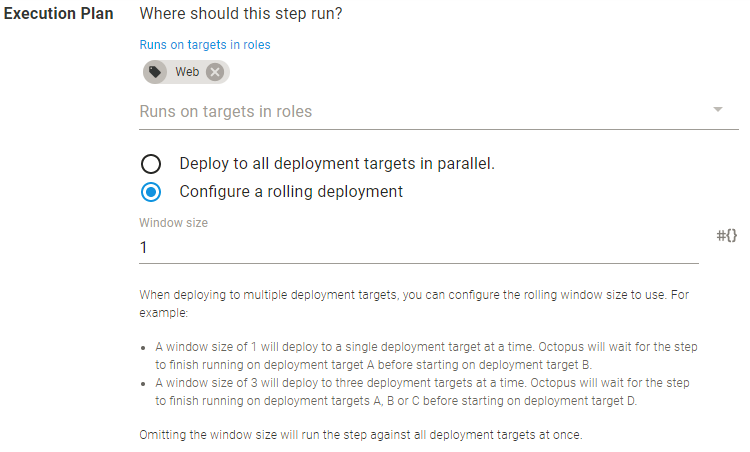
First is to configure your process that deploys your web application within Octopus. Octopus has the ability to perform the rolling deployments pattern:Rolling deployments are a pattern whereby, instead of deploying a package to all servers at once, we slowly roll out the release by deploying it to each server one-by-one.
You can configure rolling deployments per individual process. Go into the individual process and configure the execution plan to be a rolling deployment.
AWS ELB
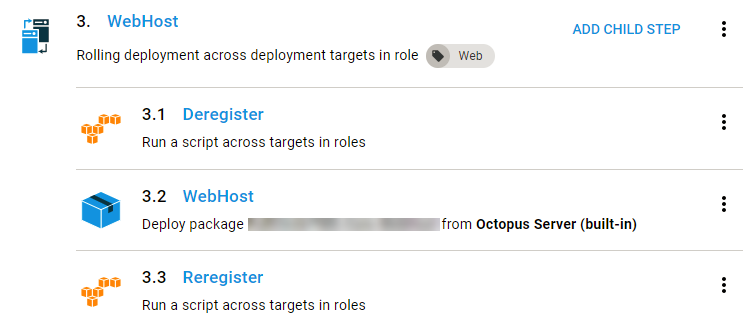
Since you you have your web application in front of an AWS Elastic Load Balancer, you can add chid steps to the primary step above which will:- Remove the EC2 instance from the ELB Target Group
- Perform the upgrade of your web application to the EC2 instance
- Re-register the EC2 instance with the ELB Target Group.